
Like
The basic yes. Anyone in your crew can Like another crew. Free.
How it works
No solo swiping, no awkward 1-on-1 first meets. Just your crew mixing with another crew — and seeing where it goes.
Step 01
Bring up to 4 mates together — that's a max group of 5 (you plus four). Pick photos, set the vibes, write a few lines. Each person's bio shows up on your crew's profile. The more honest your group's vibe, the better the mixes you'll find.

Step 02
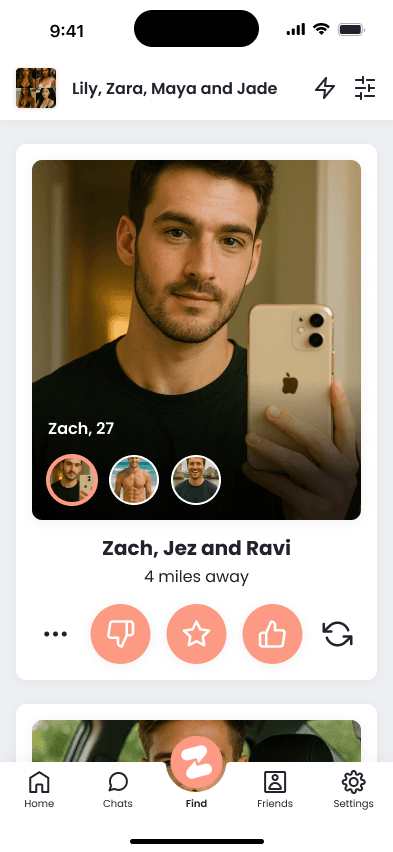
Browse other groups nearby and like the ones who stand out. Anyone in your crew can Like. Use a Super Like to stand out, or send a Super DM to message a crew before they've Liked you back. When both groups are a yes, you go straight into it — a new group chat opens, all of you together.
Step 03
Once you've mixed, the mixed group chat opens — everyone in both crews. Sort the plan, share the location, drop a GIF, agree on the night. Pubs, festivals, brunches, gallery hops — your call. Then go meet up.

The actions
Four ways to start a connection. All free to use; some have premium upgrades.
The basic yes. Anyone in your crew can Like another crew. Free.
Stand out. The other crew sees a star next to your profile.
Skip the Like-then-wait queue. Send a message to a crew before they've Liked you. They see your message + can Start chat directly. The pre-mix way in.
Once you've mixed, everyone in both crews is in one chat. Plan together.
Make the mix happen
Live now in the UK on iOS and Android. Free to download. Make a crew in minutes.
See also: Safety · Community Guidelines